
Photoshop Tips: Adding Catch Lights to Eyes
Learn to Greatly Enhance a Person's Portrait By Drawing Attention to Their Eyes

So when would you need to be adding catch lights to eyes, whether it is a baby, group shot or animal? If your shots seem a little bland, the chances are that it could be in the eyes. Normal human behaviour is for us to look straight to the eyes of any subject whether we are:
I have been known to spend hours on a group shot adding a "sparkle" to the eyes of each individual eye of over 20 people. It may sound crazy but it really does show! You can do this in Lightroom or Photoshop but for this tutorial, I shall use Adobe Photoshop.
The trick is not to overdo it like I have in the following example. The reason I have done this is that when an image is reduced severely in size, it is more difficult to see the change. A subtle yet noticeable change in your subject's eyes will have them reeling in glee when they see your photographs of them. As they too will look straight to their own eyes!
Step 1: The Tools

Adding catch lights to eyes - Fig. 1
Firstly, select the dodge tool. This is a term that originates from "dodging and burning" from the original darkroom with film photography. Dodging means you are dodging the light from hitting the image therefore making it lighter, and by burning, you are burning more light to the image making it darker.
Then set the range to highlights. This will just allow the tool to work on the highlighted areas of the eyes, leaving the darker areas alone, which gives a more natural overall end result.
Set the exposure as low as you can, I normally use a setting of 3%. This means that you won't overdo it. Set it to 100% and see what happens! However, if you want to increase the effect, you can simply "left click" and brush again and again to add to the effect little by little.
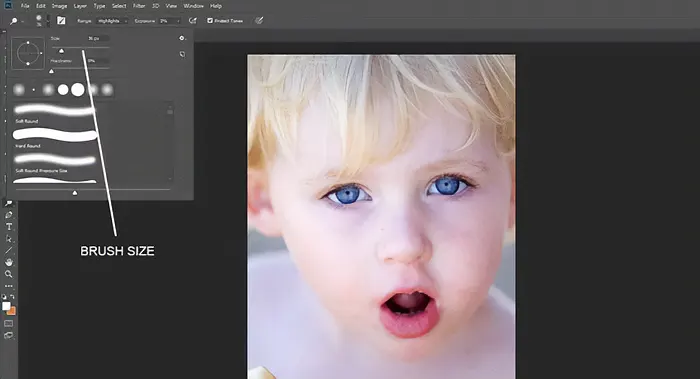
Adding catch lights to eyes - Fig. 2
Zero Hardness
Now, select the brush size menu and set the hardness to "0" or zero. This will automatically select a soft edged brush. This helps to blend the alterations in, again giving a more natural look. You can also select the brush manually by using the drop down menu and choosing a "fuzzy" brush.
Also set the diameter very small. You want to zoom in on the eyes and work in close up mode!

Adding catch lights to the eyes – Fig. 3
By repeatedly "painting" the brush over the selected areas, you will start to see the catch lights coming through. Once in a while zoom back out to check your progress, and when you are happy…stop. It is all too easy to go over the top and make the effect look more drug-induced than that of using Photoshop!

Adding catch lights to eyes – Fig. 4
This is a Non-Sponsored Post How To Properly Photograph An Accident Scene For Insurance And Legal Claims Most collision claims fall apart
THIS IS A NON-SPONSORED POST Insta360 Luna Ultra vs DJI Pocket 4P: Could Leica Optics and a Detachable OLED Screen Lure a
THIS IS A SPONSORED POST NEEWER Q120 Studio Flash: Quirky Yet Powerful, Portable and Versatile The NEEWER Q120 Studio Flash is so different